Skip to content

Conference room A/V installation

Meeting rooms that just work. Audio visual (A/V) for Texas businesses: displays, video bars and microphones, TV and monitor mounting and digital signage, set up by the same team that runs your IT, with every cable out of sight.

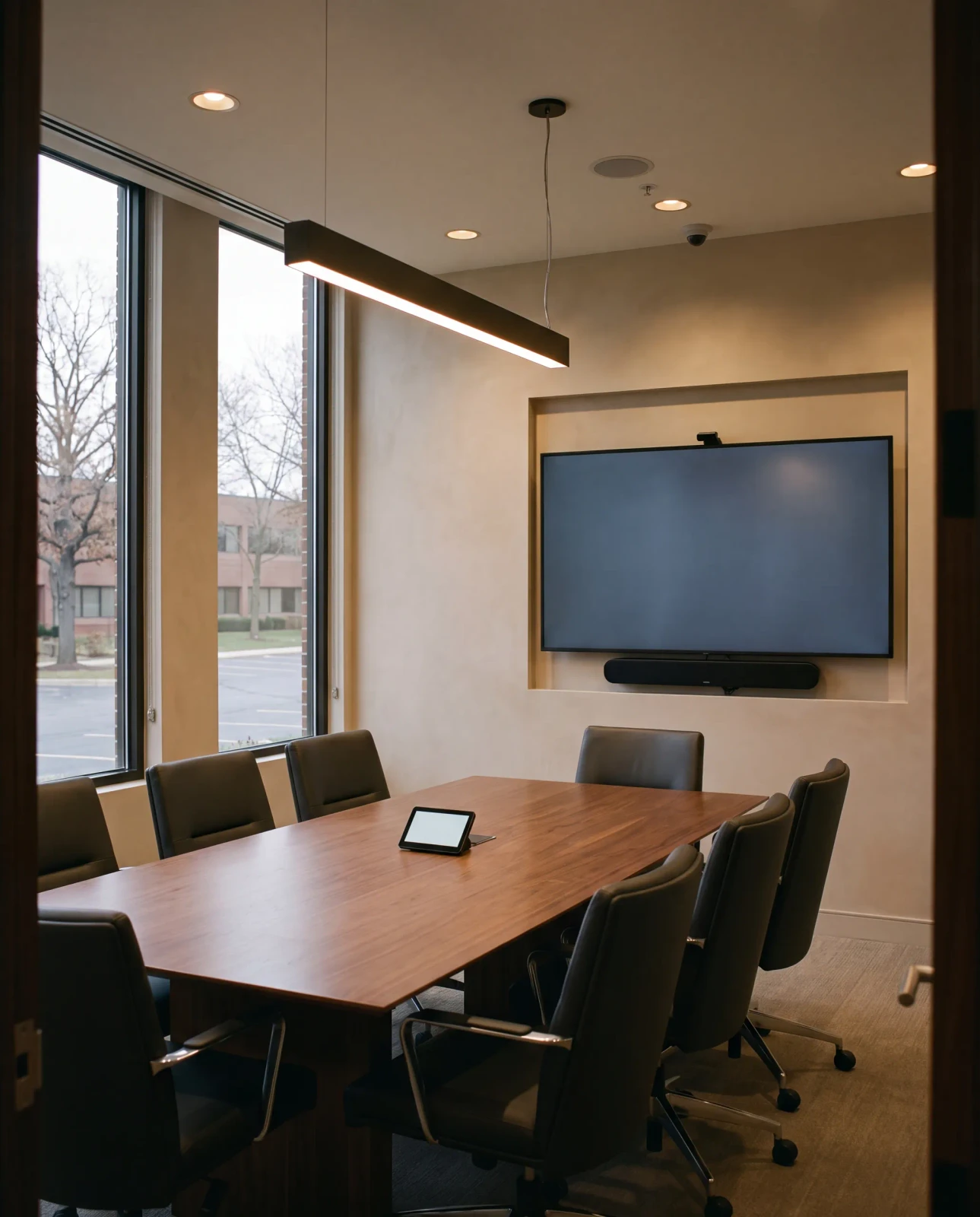
Conference room with a wall display, a video bar under it and a touch panel on the table
  • Conference room A/VDisplays, video bars and microphones

  • Every cable out of sightIn the wall and above the ceiling

  • TV mounting and signageScreens for every room in the office

  • 24/7 supportFrom our in-house help desk

Conference room audio visual setup

A meeting room that just works is four layers, planned together. Switch them on and off to see where each one goes, and where the equipment doesn't.

Switch a layer on or off.

  • The display goes on the wall where the whole table can see it. No equipment boxes under or beside it: just the slim video bar below.

  • The camera and speakers sit in one slim bar under the display, so the people on the call can see and hear the room.

  • Microphones in the ceiling over the table pick up the room, so nobody has to lean in or pass a microphone along.

  • Every cable runs inside the wall and above the ceiling, back to the rack in your equipment room. Nothing hangs under the screen.

A typical meeting room: the end wall, cut through to the equipment room next door.An example. Every room is planned on site.

TV mounting and digital signage

Screens beyond the meeting room, put up with the same rules: level on the wall, the cables inside it, the equipment in the rack.

TV and monitor mounting

TVs and monitors mounted on the wall in break rooms, reception areas, offices and training rooms, at a height that suits the room.

  • Level, on a bracket chosen for the wall
  • Power and data behind the screen
  • Cables run inside the wall, not down it

Digital signage for business

Screens in reception areas, lobbies and break rooms for welcome messages, schedules and notices, connected to your network.

  • Planned with your network from the start
  • Content players in the rack, not on a shelf
  • Supported by the same help desk, 24/7

A/V support from your IT team

When the screen won't share, is it the display, the laptop or the network? Plenty of businesses have a different company for each. We look after all three, so it's one call, not three, to a help desk that already knows your office, 24/7.

Three companies

  • The A/V companyThe display and the video bar
  • The IT companyThe laptops and computers
  • The network companyThe switches, firewall and Wi-Fi

Three numbers to find, and each one looks at its own part.

One team

  • The display and the video bar
  • The laptops and computers
  • The switches, firewall and Wi-Fi
855-398-3988

One call to a help desk that already knows your office.

  • 24/7 support from our in-house help desk, never outsourced. Erin Bienert, our IT Director, runs it herself.
  • About 30 minutes for most requests, usually in one call.
  • The cabling and the rack too. The same team runs the cables and builds the rack the A/V equipment lives in.

A/V is part of the same managed IT service: the help desk that looks after your computers looks after your meeting rooms and screens too.

More about managed IT and the help desk

A/V cabling hidden in the wall

What you see in a finished meeting room is the display, the video bar and the microphones in the ceiling. Everything else is in the wall, above the ceiling or in the rack.

  • The display goes where the whole table can see it. No equipment boxes under or beside it: just the slim video bar below.

  • The A/V equipment lives in the rack in your equipment room, alongside your network.

  • Every cable runs inside the wall or above the ceiling. None across the table or the floor.

  • The cabling is labeled and tested, like the rest of your network.

    More about structured cabling
  • Display and video bar, on the end wall
  • Ceiling microphones
  • Microphone pickup over the table
  • Hidden runs to the rack in the equipment room
The same room from above. Two microphones in the ceiling, placed so their pickup covers the table, and every run hidden above the ceiling on its way to the rack.

Bespoke A/V packages for your business

No off-the-shelf tiers. We meet you face to face, look at your rooms and what you already have, then build one package around it: only what your business needs, from one team, competitively priced.

  1. We meet youA face‑to‑face conversation about how your business runs and where you want to grow.
  2. We look at your setupYour network closets and server room, your carriers and the software your team relies on.
  3. We build your packageOnly what you need, in one proposal from one team.
Book a consultation

Your package An example

  • Conference room display and video bar
  • Ceiling microphones
  • TV and monitor mounting
  • Digital signage in reception
  • Cabling back to the rack
  • 24/7 support from the help desk

Not this:BronzeSilverGold

Every package is written for one business, after we've met. Yours will look different.

Questions about conference room A/V

Something else? Call us at 855-398-3988.

Do you install conference room A/V?

Yes. We set up conference and meeting rooms with displays, video bars and ceiling microphones, and run every cable out of sight, back to the rack in your equipment room.

Do you mount TVs and monitors?

Yes. We mount TVs and monitors on the wall in break rooms, reception areas, offices and training rooms, with the cables run inside the wall instead of down it.

Do you set up digital signage?

Yes. We install digital signage screens for reception areas, lobbies and break rooms, connected to your network, with the content players kept in the rack and supported by our help desk.

Where does the A/V equipment go?

In the rack in your equipment room, alongside your network, not under or beside the screen. The cables to the display, the video bar and the microphones run inside the wall and above the ceiling.

Can the same team look after our IT?

Yes. Managed IT is where we start: 24/7 support and an in-house help desk that is never outsourced, run by Erin Bienert, our IT Director. A/V, cabling, phones, cameras and access control come from the same team.

How do we get started?

Book a consultation or request a callback. We meet you face to face, look at your rooms and what you already have, then build a bespoke package around what your business needs.

A/V brands we install

We look after the equipment you already have, and these are the brands we typically install when it's time to add or upgrade.

  • Yealink logoYealinkPhones and meeting room video
  • Sonos logoSonosAudio
  • JBL logoJBLSpeakers and audio
  • Episode logoEpisodeSpeakers
  • Harman logoHarmanAudio and control

Logos and brand names belong to their owners. Equipment is chosen for each job as part of your bespoke package.